Wetin if di product link no import?
- Page no dey available: use public page or add information and authorised photos by hand.
- Wrong information: check variant, name and description before you save.
- Repeated or unsuitable photos: choose clear reference; no be every imported image fit video.
Import depends on whether the system fit access the source page and the details wey the page provide. If page no open or details no complete, add product information and photos wey you get permission to use, then continue video creation.
For dis page
How ProductAd dey turn product URL into video ad?From product link to full video: AllbirdsAcme Mug: presenter video wey no get watermarkI fit try product video adverts wey no get watermark for free?ProductAd workflow and video settingsSet wetin quality meanPrepare and select your productChoose video workflow and typeSet duration and advert languageWrite dialogue and scene instructionsGenerate and check di whole resultDownload and plan di next correctionQuestions wey people dey askPrepare product and reference photo. Open Video Ad Creation, select video type, duration and language. Write dialogue separate from scene instructions. Check credits before submitting, then compare di full result with di real product. Quality here mean correct product, clear message and usable result wey you don review.
Inputs and results we don check
From product link to full video: Allbirds
ProductAd import di Men's Tree Runner product link. Di team save di product, choose one imported picture and make five-second English ad wey fit play for Product-led Video mode. Person dey for di video and di shoe dey carry di main attention.
Acme Mug: presenter video wey no get watermark
We use one product photo and saved mug details make am. Na ProductAd team demo, no be customer endorsement or product-link import test.
Estimated credits
The form estimates 120 credits per second: 4-second request shows 480 credits. Na estimate for one request, no be total cost of approved result. Revisions fit need extra requests.
These team tests no prove better quality or lower cost than competing tools. We never measure total credits with retries or full production time.
How ProductAd dey turn product URL into video ad?
ProductAd na AI product video ad maker for ecommerce sellers and marketing teams. Start with Shopify, Amazon or another product page wey the system fit read. Import available images and product details, then use dem with your ad message and creative instructions to generate product-led or presenter-led video. You fit start with your own product photos too. Choose your product and available video template. Use the template as creative reference for new product video, so you no need plan every ad from zero.
Product video ad creation
Start with imported product or your own photos. Add dialogue and scene instructions, choose product-led or presenter-led style, then generate new video ad.
Video template adaptation
Choose your product and available video template. Use the template as creative reference for new product video, so you no need plan every ad from zero.
Which teams this workflow fit help?
Small ecommerce teams wey get product pages or photos but no get plenty video-production resources. Reusing existing content fit reduce manual image gathering, repeated data entry, copy preparation and basic video assembly. The aim na to make product ads easier without starting every creative from zero.
Wetin I fit create and download?
Create short product showcase or presenter video ads, check dem inside your projects and download results without watermark. ProductAd still supports image ads and promo posters. Sign up to try video creation free; check the free-trial details for allowance and estimated use.
Import depends on whether the system fit access the source page and the details wey the page provide. If page no open or details no complete, add product information and photos wey you get permission to use, then continue video creation.
Decide wetin good result mean before you create.
For product advert, clear message matter pass complicated scene. Choose one buyer question: how di product look, one package detail, or how one verified action work.
- Product correctness: match di reference color, shape and package words.
- One clear message: show one benefit or visible detail for each clip.
- Clear delivery: make visuals, dialogue and advert language agree.
- Result wey you fit use: play di whole file and check whether e ready for editing or publishing.
Na production acceptance checks be these. After publication, measure advert clicks, registration and purchases separately.
Prepare product, then choose reference.
Log in to di real workspace and open product library. Select existing product, or use Add product to import public product URL or enter details and pictures by hand.
Check imported name, variant, description and photos. If link no readable, prepare dem by hand. Save product, then select am and clear reference photo for video creation.
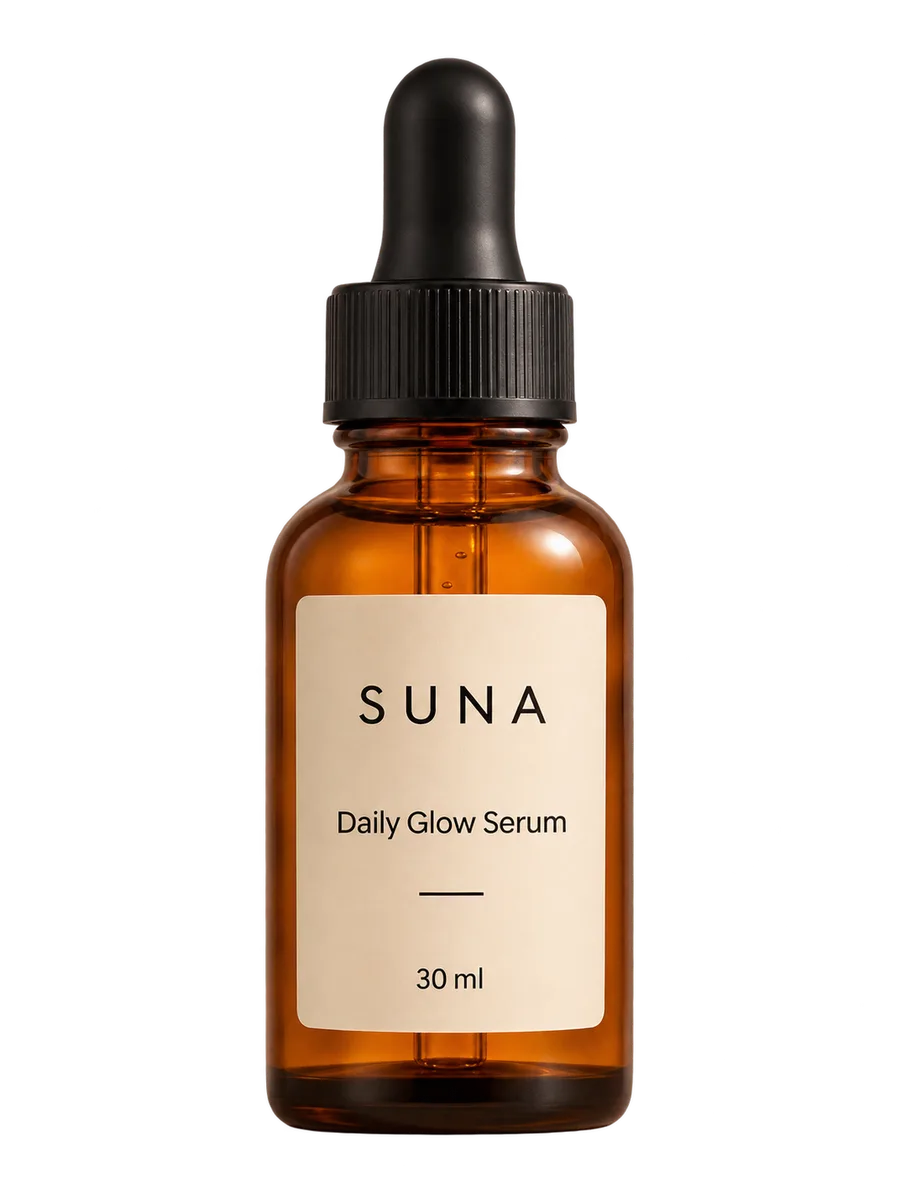
SUNA / 30 ml
- Amber bottle and black dropper
- Choose photo wey show package and label clearly
- Use di same product variant throughout
Open Video Ad Creation and choose di type.
From Generate Ads, open di normal Video Ad Creation workflow. E different from video cloning wey need template selection and confirmation. Dis tutorial start with normal creation from product material.
Product-led video
Good place to start if you wan show appearance, package and one visible detail. Make di first scene simple.
Presenter-led video
Useful if creative need spoken explanation. Keep dialogue short; check delivery, product appearance and actual sound.
Dis illustration use Product-led to keep product for center. Person or style wey you see for showcase no mean di same option dey your account.
Check duration, language and estimated credits.
Choose duration wey fit one scene, then choose advert language. Interface language and advert language dey separate: you fit use another interface language prepare English advert.
Register to try AI product video adverts wey no get watermark for free. Start with product link or your own photos. New users get 600 credits when dem register for ProductAd. You fit use these credits try AI product video advert creation for free. For di current estimate of 120 credits per second, one 4-second request dey use 480 and leave 120; one 5-second request dey use 600. Na allowance for generation request, no be unlimited videos or guaranteed result. Check di estimate before you submit; to generate again dey use more credits.
 ProductAd / Video Ad CreationWORKFLOW ILLUSTRATIONSUNA / 30 mlProduct and reference don select
Look SUNA bottle and package well.
Light sage-green background, soft side light and slow camera push. Keep bottle and label correct.
Write spoken words separate from visual instructions.
Dialogue prepare wetin person go talk. Extra instructions describe scene, light, camera, action and product details wey must remain. Replace “make premium advert” with specific scene.
Submit once and check di whole result.
For di real workspace, check product, reference, type, duration, language and credits, then submit. While e dey process, check di existing project; no create new tasks just to refresh.
Once result show, watch am from beginning to end and compare with reference. Fine cover frame no mean di whole video correct.
If task fail or result never show, keep project and error information, then check that same task. Waiting time and solution depend on di current service and support response.
Keep di usable version; change one thing next.
When result ready, open download for phone and computer. Check actual dimensions, duration, crop and sound. Name am with product and creative direction so comparison easy.
When you revise, name one specific problem. “Reduce camera movement” or “keep whole bottle for final frame” clear pass “make am more premium.”
ProductAd ·
From product link to full video: Allbirds
ProductAd import di Men's Tree Runner product link. Di team save di product, choose one imported picture and make five-second English ad wey fit play for Product-led Video mode. Person dey for di video and di shoe dey carry di main attention.
Di history show say dem deduct 600 credits. From when dem deduct am until we first see say di video ready, na about 13 minutes 20 seconds. Na di time between di two checks, e no be exact server render time.
Di whole shoe show for di frames we check, including di last frame. Automatic transcript match di dialogue we send. Na ProductAd team demo without endorsement from di brand.
See the original product page · Men's Tree Runner ↗
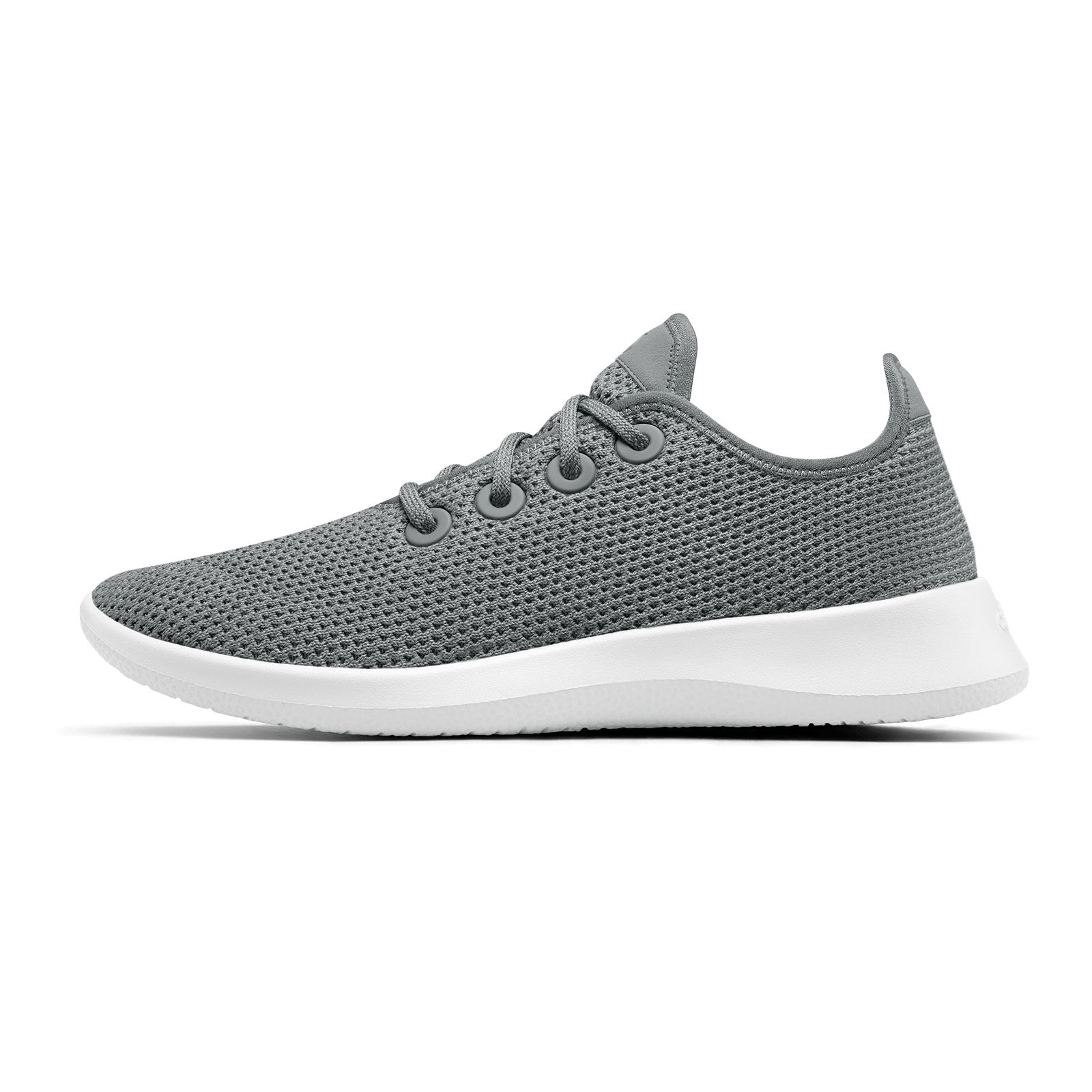
Meet the Men's Tree Runner. See the details.
MP4 · 1080 × 1882 · 5.04 s · 24 fps
Product link import work: Allbirds test ·
We test one new Allbirds product URL for ProductAd. Import, save and move to video creation work. This case show the import process, no be finished video.
- Paste the URL: ProductAd collect the product name and 16 images.
- Save the product: the new record still dey after we reload the product library.
- Open Video Ad Creation: the product and all 16 images load, and the generation button dey available.
Check before you generate: the description na general instruction, no be the full source-page description; prices dey empty. If you remove query parameters, the 16 image URLs get 14 different paths; some na different sizes of the same image.
We no request video generation and the credit balance no change. Na ProductAd team workflow test, no be customer testimonial or Allbirds endorsement. This result cover this URL, no be every store.
Start to create for freeAcme Mug: presenter video wey no get watermark
Updated
We use one product photo and saved mug details make am. Na ProductAd team demo, no be customer endorsement or product-link import test.
Settings: presenter-led video, 5 seconds, English. We enter dialogue and scene instructions separately.
Meet Acme. Matte black, with a cork-style base.
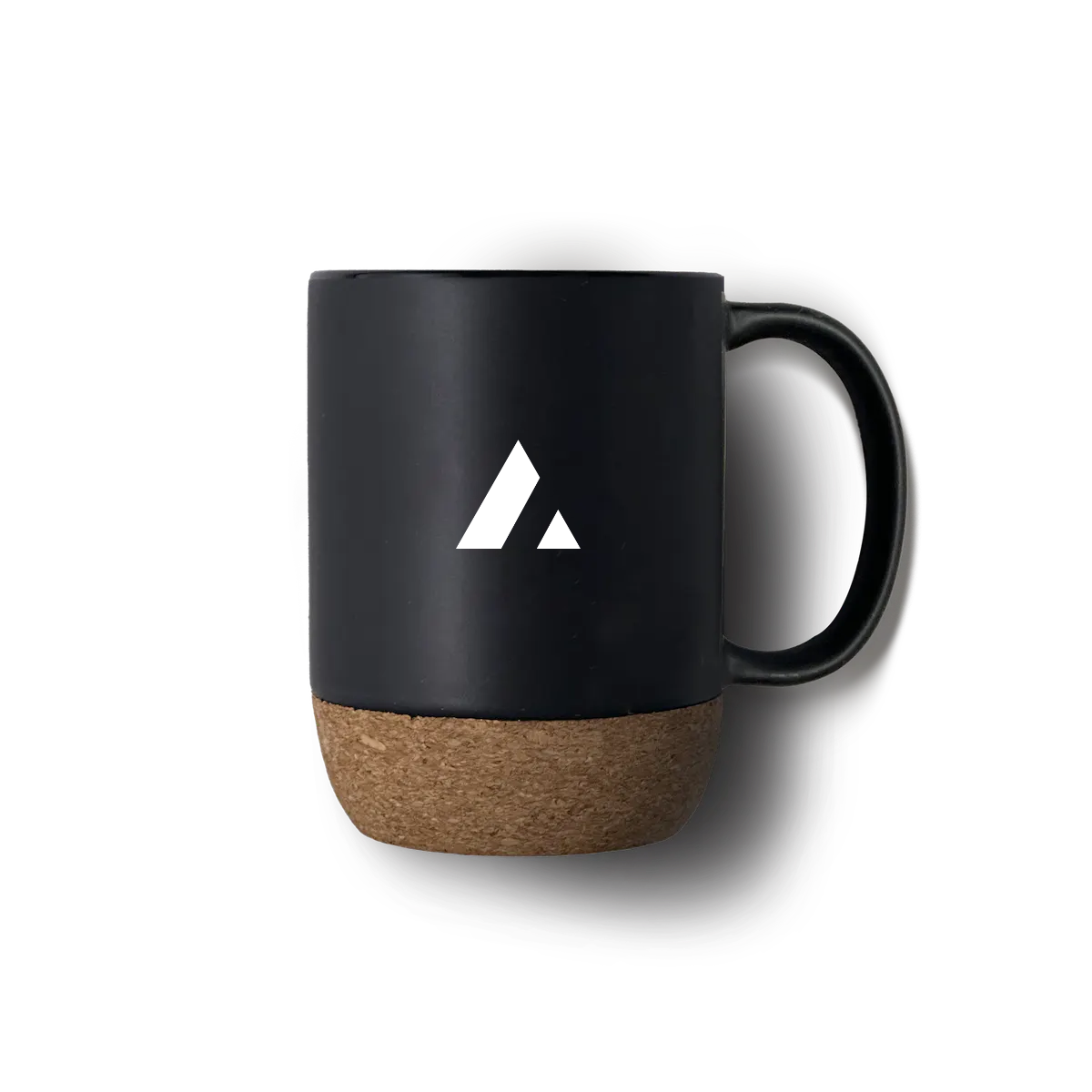
Presenter introduce the mug for camera. You fit still recognize the matte-black body, brown base, right handle and white logo. Local speech recognition match the English line we ask for. The video no get platform watermark; the white mark for the mug na the original product logo.
Export we check: MP4/H.264, 1080 × 1882, about 5.04 seconds, 24 fps, with AAC speech. The size no be exact 9:16. This example no prove advert results or exact lip-sync.
How to do am: choose product photo and presenter-led video, enter dialogue and scene separately, then check the full video.
Dialogue and scene instructions (English original)
DIALOGUE
Meet Acme. Matte black, with a cork-style base.

ADDITIONAL INSTRUCTIONS
Create a realistic 5-second presenter-led ecommerce video using the exact Acme mug in the selected reference photo.

PRODUCT IDENTITY
The reference mug has a matte-black body, a warm tan cork-textured base, one curved handle on the viewer's right and a white geometric logo on its front. Preserve its silhouette, handle opening, rim, base height, colors and original logo throughout. Show exactly one mug. The base may be described as cork-style; make no claim about its actual material, insulation, leak resistance, durability, certification or other unverified performance.

PRESENTER AND SET
Show one clearly adult presenter in a plain navy shirt, seated behind a clean light-gray tabletop in a bright, uncluttered home-studio setting. The presenter speaks directly to the camera with a friendly, natural expression. No celebrity likeness, customer testimonial, endorsement, ratings or claimed personal results.
Place the actual reference mug upright in the foreground, with its front logo facing the viewer and its handle on the right. Keep the complete mug visible, including its rim, handle and tan base. The presenter may make a small open-hand gesture beside the mug but must not grasp, lift, cover, pour into or drink from it. Keep the mug stationary so its shape and logo remain consistent.

TIMING: ONE CONTINUOUS SHOT
0.0-0.5 seconds: show the presenter and complete mug together; the mug is already on the table.
0.5-4.5 seconds: the presenter says the exact words in the separate Dialogue field once, in a clear, natural English voice. Keep speech intelligible and the visible speaking mouth consistent with the voice. Use no extra spoken words.
4.5-5.0 seconds: finish the line and hold a friendly final pose with the complete mug still clearly visible.
Use a steady portrait composition with soft daylight and natural contact shadows. No cuts, camera orbit, dramatic zoom, product transformation or transitions.

AUDIO AND GRAPHICS
Use only the presenter's English speech and very quiet natural room tone. No music or sound effects. No added captions, pricing, discount claims, performance figures, watermarks or extra logos. Preserve only the original white logo already on the mug.

ACCEPTANCE PRIORITIES
A visible adult presenter actually introduces the mug; the product remains faithful to the selected image; the complete spoken sentence is audible; no unsupported claim or invented accessory appears. Keep the scene simple enough to complete within five seconds.
I fit try product video adverts wey no get watermark for free?
Register to try AI product video adverts wey no get watermark for free. Start with product link or your own photos.
Free trial details
New users get 600 credits when dem register for ProductAd. You fit use these credits try AI product video advert creation for free. For di current estimate of 120 credits per second, one 4-second request dey use 480 and leave 120; one 5-second request dey use 600. Na allowance for generation request, no be unlimited videos or guaranteed result. Check di estimate before you submit; to generate again dey use more credits.
Register, check your credit balance, import product link or add your own photos, then choose Video Ad Creation and 4 or 5 seconds. Watch di full result before you use am. Registration credits different from paid subscription trials.
ProductAd workflow and video settings
Updated
Starting material
Import public product link and check the details and pictures, or add them yourself. We never verify import success for every shop platform.
Video settings
Product-focused or presenter video. The form offers 4 to 15 seconds, one second at a time, and 15 ad languages.
Estimated credits
The form estimates 120 credits per second: 4-second request shows 480 credits. Na estimate for one request, no be total cost of approved result. Revisions fit need extra requests.
Output controls
Videos no get platform watermark. Write dialogue separate from scene instructions. This workflow no get separate aspect-ratio selector or subtitle-track editor. Check the actual file dimensions, format, sound and captions.
These na creation settings, no be tested output specifications. Even when task don finish, check the full video before you call am verified example.
PricesQuestions to ask before you start
Make I start with Product-led or Presenter-led?
Start with Product-led if you wan show appearance or packaging. Consider Presenter-led if person go explain. Check di actual result.
Wetin I go do if product URL no import?
Enter correct details and add pictures wey you fit use by hand. Save product, then select am and its reference for video creation.
Wetin different between dialogue and instructions?
Dialogue na wetin person go talk. Additional instructions describe background, light, camera, action and details wey must remain. Di real video workflow get separate inputs for dem.
Dis guide guarantee high-quality advert?
Guide help prepare inputs and check results. E no guarantee say every generation usable. You need real campaign measurement to know advert performance.
Dis tutorial get tested generation result?
ProductAd import di Men's Tree Runner product link. Di team save di product, choose one imported picture and make five-second English ad wey fit play for Product-led Video mode. Person dey for di video and di shoe dey carry di main attention. From product link to full video: Allbirds →
We use one product photo and saved mug details make am. Na ProductAd team demo, no be customer endorsement or product-link import test. Acme Mug: presenter video wey no get watermark →